External sharing
Links with an expiry, a view limit or a password
Share a wiki page or a briefing with a client without giving them workspace access. The link can expire, stop after a number of views, or ask for a password — and you can revoke it any time.
In short
Share a wiki page or a briefing through a link — with an expiry, a view limit or a password — and revoke it any time, without giving anyone access to your workspace.
In the app: /settings/shares
What it gives you
Limited on purpose
Set an expiry in days, a maximum number of views, or a password. Past the limit, the viewer sees that the link has expired.
Revocable
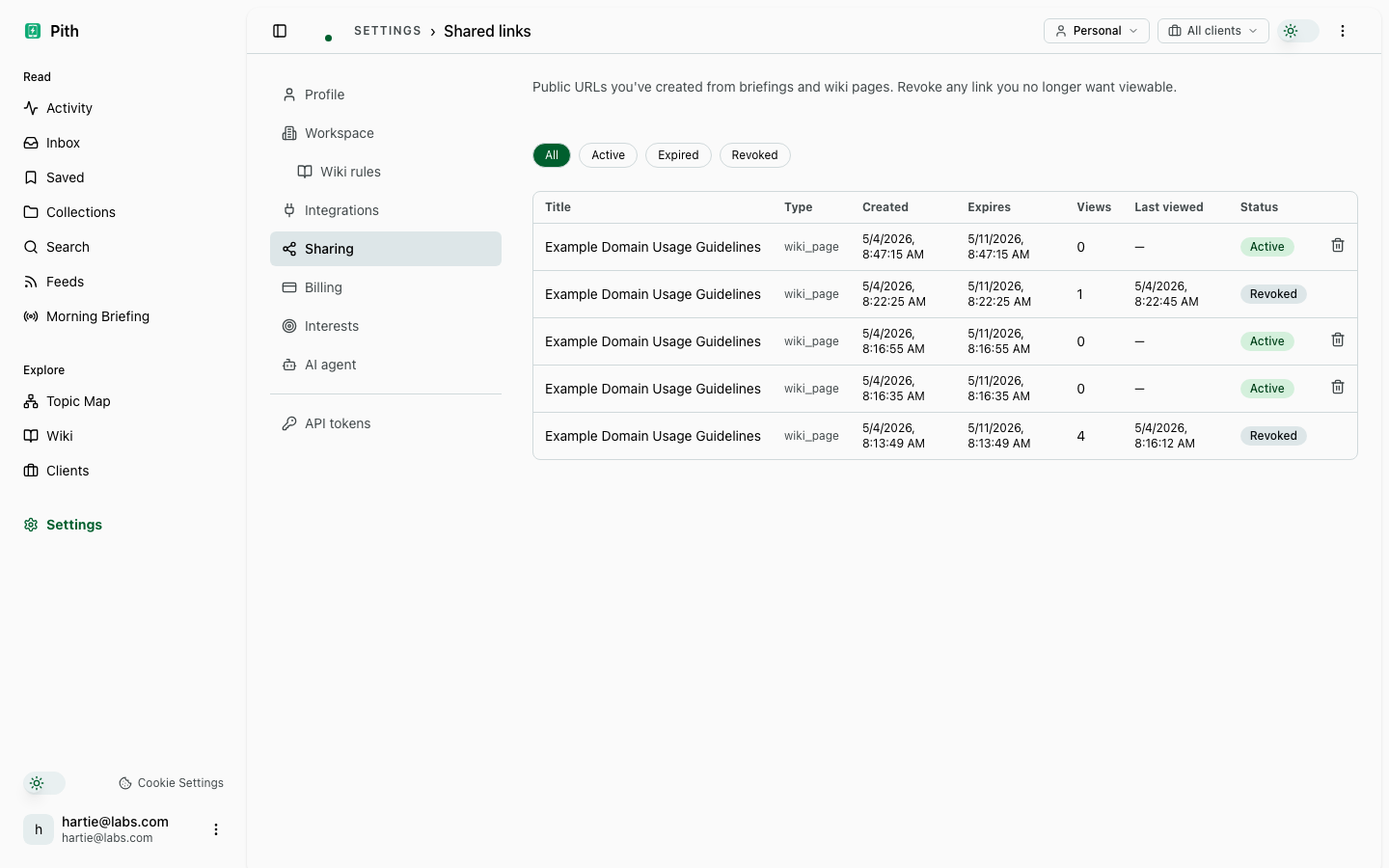
Settings → Sharing lists every link. One click revokes it — the link stops working immediately.
You see who opened it
Each link shows when it was last opened and how many distinct viewers it had, with a log of every access.
How it works
- 1
Open a wiki page or a briefing.
- 2
Click Share → set expiry, view limit or password → copy the link.
- 3
Track or revoke it under Settings → Sharing.
Other ship value features
Try it for yourself.
No credit card. Try External sharing in your own workspace — AI actions cost cents from a prepaid credit, and there is €1 free every month.
Start free