Wechselbereitschaft nach der Pocket-Abschaltung 2025
Mozilla hat Pocket am 8. Juli 2025 abgeschaltet und im November die exportierten Daten gelöscht — Millionen gespeicherter Artikel brauchen ein neues Zuhause. Die gute Nachricht: Der Read-Later-Markt ist lebendiger denn je und reicht von schlichten Lese-Apps über Power-Reader-Tools und All-in-one-Bookmark-Manager bis zu selbst gehosteter FOSS und KI-organisierten Sammlungen. Diese Liste beginnt mit Pith (wir haben es gebaut, deshalb steht es vorne) und gibt jedem Mitbewerber eine ehrliche Beschreibung, damit du nach echtem Bedarf statt nach Hype wählen kannst.
- 1
Pith
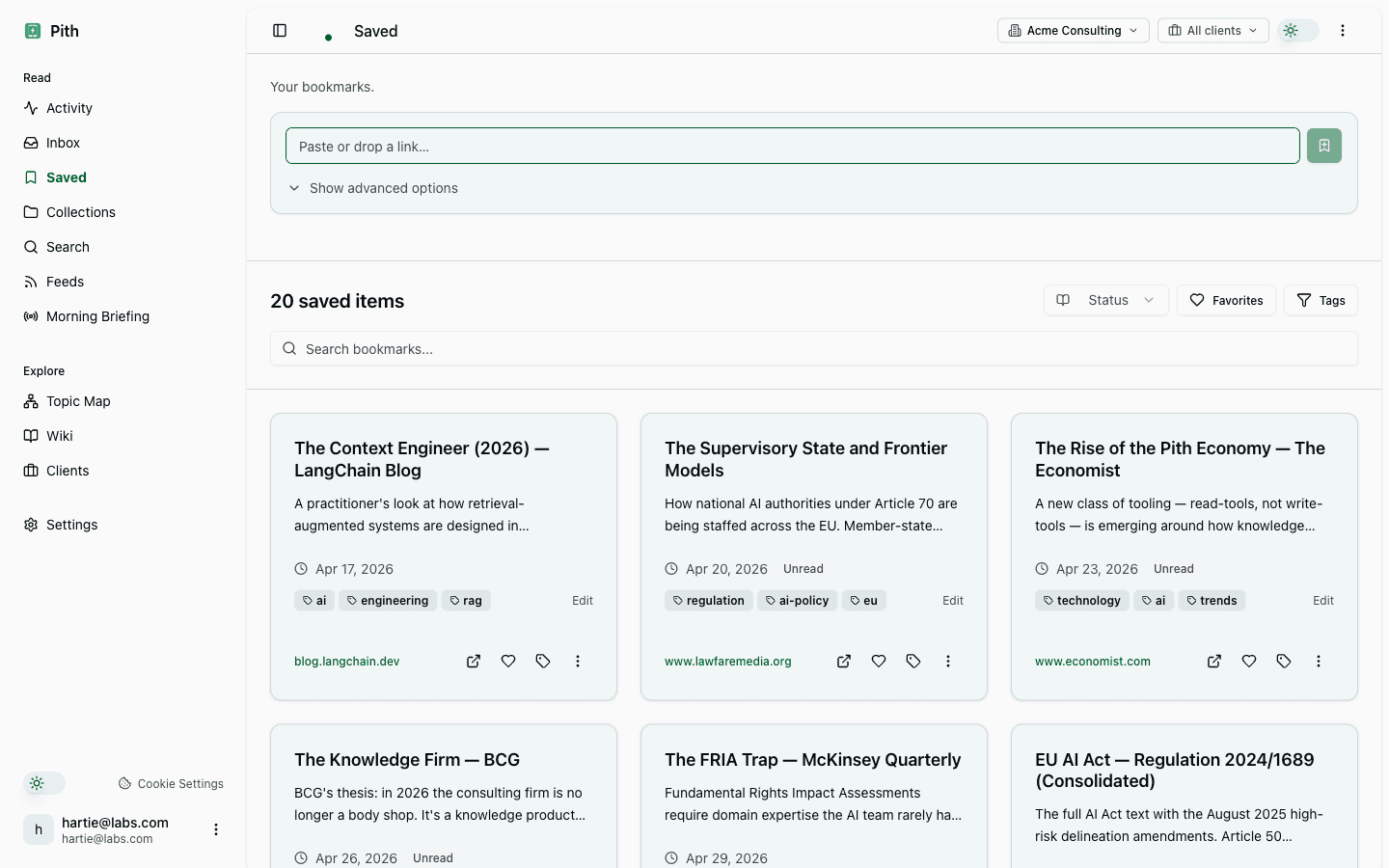
Website besuchenPith ist ein Lese-Gedächtnis: Du speicherst, was du liest, und Pith baut daraus automatisch ein zitiertes Wiki und Briefings pro Kunde — jede Aussage verlinkt zurück zur Quelle. Die Daten liegen in Frankfurt (EU), und ein MCP-Server lässt KI-Assistenten wie Claude oder ChatGPT dein zitiertes Wissen direkt abfragen. Gedacht für Beratende und Forschende, die viel lesen und Gelesenes wiederfinden und weiterverwenden müssen.
Gut für: Aus einer Lesewoche eine zitierte, abfragbare Wissensbasis machen
Pith ist jung und bewusst schmal aufgestellt — DACH-fokussiert und auf Synthese ausgelegt, also überdimensioniert, wenn du nur eine aufgeräumte Leseliste willst.
- 2
Raindrop.io
Website besuchenRaindrop ist ein eleganter All-in-one-Bookmark-Manager mit verschachtelten Sammlungen, Tags, Volltextsuche und einem integrierten Lesemodus, der Ablenkendes entfernt. Es speichert Kopien gesicherter Seiten, sodass tote Links lesbar bleiben, läuft in allen gängigen Browsern und Plattformen und hat kürzlich einen KI-Assistenten (Stella) bekommen. Die großzügige Gratis-Stufe reicht für Gelegenheitsnutzung, Pro kostet rund 3 $/Monat.
Gut für: Große Link-Sammlungen über Projekte hinweg ordnen
Es ist primär ein Bookmark-Manager, daher ist das Lese- und Markier-Erlebnis schlanker als bei reinen Read-Later-Apps.
- 3
Readwise Reader
Website besuchenReader ist eine Read-Later-App für Vielleser und verarbeitet Artikel, PDFs, EPUBs, Newsletter, RSS, X-Threads und YouTube samt Transkripten. Das tastaturgesteuerte Markieren fließt in Readwises Wiederholungs-Review und synchronisiert weiter nach Obsidian, Notion und mehr. Der KI-Assistent Ghostreader kann Gelesenes zusammenfassen und beantworten.
Gut für: Vielleser, die markieren und ihre Markierungen wiedersehen wollen
Es gehört zum kostenpflichtigen Readwise-Ökosystem, hat also keine dauerhafte Gratis-Stufe und eine gewisse Einarbeitung.
- 4
Matter
Website besuchenMatter ist eine aufgeräumte, designorientierte Lese-App mit starker Sprachausgabe, gutem Markieren sowie Newsletter- und RSS-Unterstützung. Es importiert Pocket-Bibliotheken beim Einrichten und synchronisiert Markierungen nach Obsidian, Notion, Roam und Readwise. Die Oberfläche ist minimalistisch und angenehm, mit einer frischen iOS-Überarbeitung.
Gut für: Ein schönes Leseerlebnis mit erstklassigem Artikel-Vorlesen
Die meisten nützlichen Funktionen (Markieren, RSS, KI, Premium-Sprachausgabe) liegen hinter einer Bezahlschranke von 8 $/Monat.
- 5
Instapaper
Website besuchenInstapaper ist der Veteran unter den Read-Later-Apps: ein schneller, ablenkungsfreier Leser mit anpassbarer Typografie, Markierungen, Notizen, Ordnern, Volltextsuche und Senden-an-Kindle. Es ist stabil, schlicht und hat eine brauchbare Gratis-Stufe; Premium kostet rund 6 $/Monat für Volltextsuche und unbegrenzte Markierungen. Eine sichere Wahl ohne Überraschungen.
Gut für: Ein verlässlicher, minimalistischer Read-Later-Klassiker
Die Entwicklung schreitet langsam voran, und es fehlen die KI-, Multiformat- und Überall-Sync-Ambitionen neuerer Tools.
- 6
Wallabag
Website besuchenWallabag ist die quelloffene, selbst hostbare Read-Later-App für alle, die volle Datenhoheit wollen. Es extrahiert sauberen Artikeltext, unterstützt Markieren und Annotieren, synchronisiert den Lesestatus, stellt Gespeichertes als RSS bereit und liefert an Kindle und mobile Apps. Selbst gehostet ist es kostenlos, oder du zahlst für die gemanagte Instanz wallabag.it.
Gut für: Datenschutzbewusste Nutzer, die ihr Archiv selbst besitzen und hosten wollen
Selbst-Hosting erfordert einen Server und etwas technisches Geschick (PHP, Datenbank), was es für Nicht-Techniker ausschließt.
- 7
mymind
Website besuchenmymind ist ein privater, KI-organisierter Raum für Lesezeichen, Notizen, Bilder, Artikel und Zitate — ganz ohne Ordner oder Tags. Die KI kategorisiert und reichert jeden Eintrag automatisch an, erkennt Text in Bildern und hält alles werbe- und trackerfrei. Es ist ebenso Inspirations-Pinnwand wie Read-Later-Tool.
Gut für: Visuelle Denker, die mühelose, private Organisation wollen
Es ist nur im Abo erhältlich, ohne Gratis-Stufe, und die Ohne-Ordner-Philosophie bedeutet weniger manuelle Kontrolle, als Power-User vielleicht möchten.
Starte kostenlos mit Pith.
Keine Kreditkarte. Verwandle dein Lesen in ein zitiertes Wiki.
Zuletzt geprüft: 7. Juni 2026 · CC BY 4.0 · frei zitierbar mit Quellenangabe zu Pith.